
What We’re Building Next for Virtual Machines on ZimaOS
A development preview of easier image imports, safer networking, disk snapshots, backups, and the reliability work behind them.
Development preview: This is not a release announcement or a delivery-date promise. Features marked In validation, Prototype, or Research may change before they reach a public ZimaOS build. Availability can also depend on the ZimaOS package rollout, host hardware, guest operating system, and storage or network configuration.
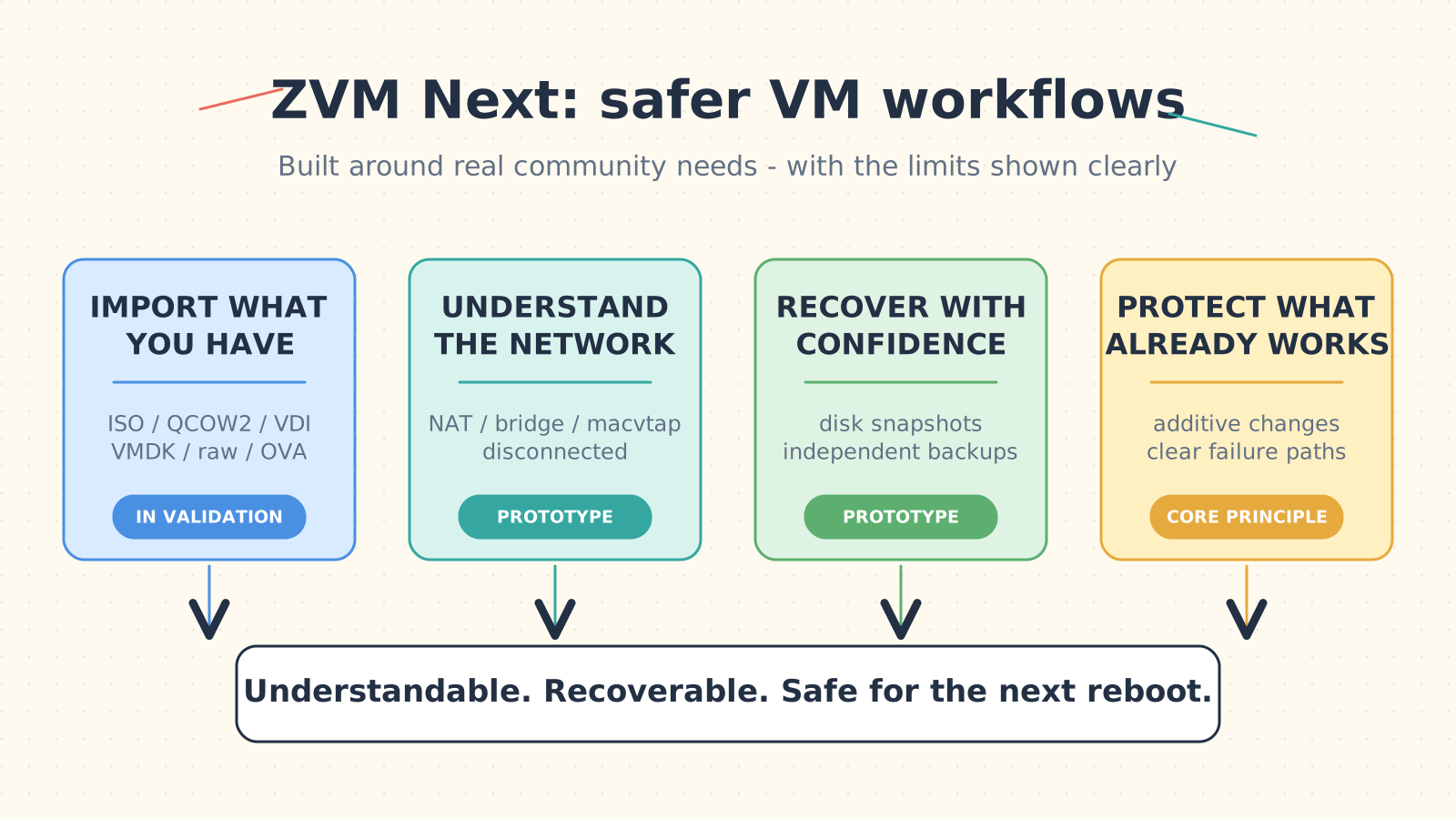
Four workstreams, moving at different speeds. The status labels in this article remain the source of truth.
Some workloads fit perfectly in a container. Others need an entire operating system.
A Windows-only utility. A Home Assistant appliance. An isolated Linux test machine. A router lab you can rebuild without touching the rest of your network. These are the jobs where a VM earns its place on a home server.
ZVM is the virtual machine service behind that experience in ZimaOS. It already provides the foundation for creating and running VMs, but the community has also shown us where the experience needs to improve. Importing an existing disk image still takes too many manual steps. Bridge networking is easy to misunderstand. Autostart, snapshots, backups, and recovery need clearer guardrails. And when an operation fails, the message should help you fix it - not just tell you that something went wrong.
We have been turning those reports into a more focused direction for ZVM. Here is what is being hardened now, what is in active validation, and what is still research.
Status at a Glance
| Status | What it means | Current examples |
|---|---|---|
| Alpha foundation | Code is in the current alpha line; device availability still depends on the ZimaOS package rollout. | Authentication hardening for the browser-based VM console path. |
| In validation | The main implementation exists, but compatibility and upgrade testing are still underway. | Direct image import, staged conversion, integrity checks, and failure cleanup. |
| Prototype | The design is running in code and tests, but its behavior and UI may still change. | Multi-mode networking, guarded bridge changes, autostart events, disk snapshots, and full backup creation. |
| Research | A direction we are investigating, not a committed release feature. | USB, PCIe, GPU, and physical-NIC passthrough; incremental backup; broader migration workflows. |
We are using these labels on purpose. A feature appearing in a development branch or prototype does not make it ready for your production VM.
Import the Image You Already Have
Many self-hosted projects publish a ready-to-run virtual disk instead of an installer. Getting that image into a VM can mean converting it by hand, moving it to the right directory, and then wiring it into a new machine.
The experience we want is much simpler: choose the image, choose where the VM should store it, and let ZVM handle the preparation.
The first compatibility target covers:
- ISO installation media
- QCOW2
- VDI
- VMDK
- raw or IMG disks
- OVA packages with OVF metadata
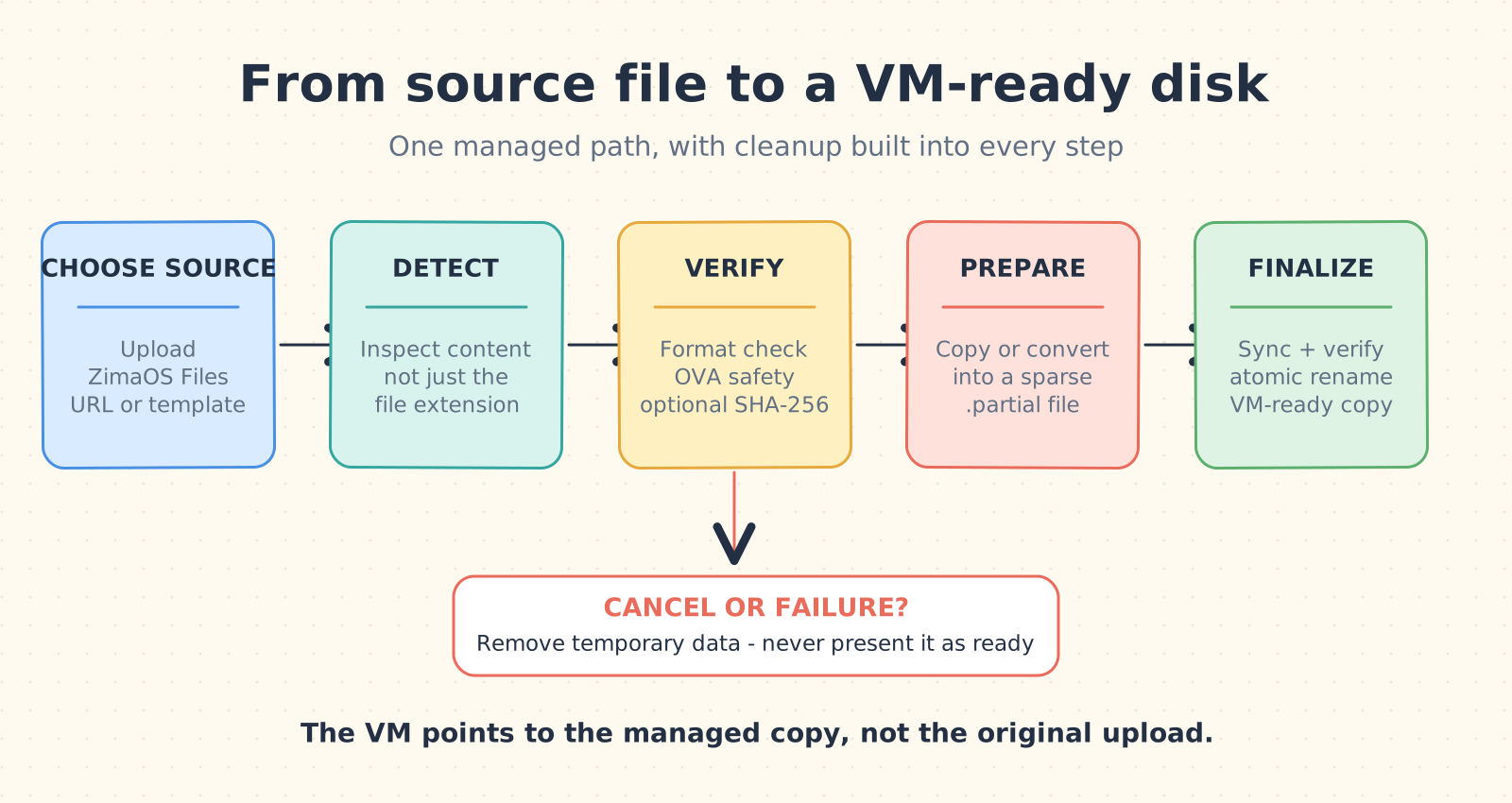
Every path ends in either a verified, VM-ready copy or a cleanup step - never a half-finished disk presented as ready.
Supporting a format means more than trusting its filename extension. ZVM inspects the content, validates the image, and copies or converts it into the storage location selected for the VM. Non-ISO disks default to QCOW2, while raw remains an advanced option. The finished VM points to the managed copy, so removing the original upload or download should not break it.
The import pipeline is designed for failure as carefully as it is for success:
- Stage the source without treating it as a finished disk.
- Detect the real format and reject unsupported or damaged images.
- Check an optional SHA-256 value.
- Inspect OVA archives and reject path traversal or unsafe entries.
- Copy or convert into a temporary
.partialfile. - Sync, verify, and atomically rename the completed image.
- Remove temporary data after cancellation or failure.
Where possible, this process also preserves sparse disk behavior. A disk with a large virtual capacity should not immediately consume that same amount of physical storage.
The longer-term UI goal is for local uploads, paths selected in ZimaOS Files, URL downloads, and built-in system templates to meet in the same VM configuration flow. This stage is about importing an image for a VM. It is not a separate image library, and it does not include VM export.
Status: In validation. The direct-import backend and regression tests exist, including a fix for versioned names such as appliance-1.2.3.qcow2. Wider device, image, and guest-OS coverage is still required.
Networking Should Be a Choice, Not a Vocabulary Test
Virtual network modes can look almost identical in a form while behaving very differently on the wire. ZVM should explain that difference before you press Save.
The network prototype gives each virtual NIC an explicit mode:
- NAT for a simple private network with outbound access.
- Linux bridge when the VM should appear directly on the LAN and communicate with the host.
- macvtap for a more direct attachment, with a clear warning that host-to-guest communication is commonly unavailable.
- Disconnected for an isolated lab or a NIC that will be connected later.
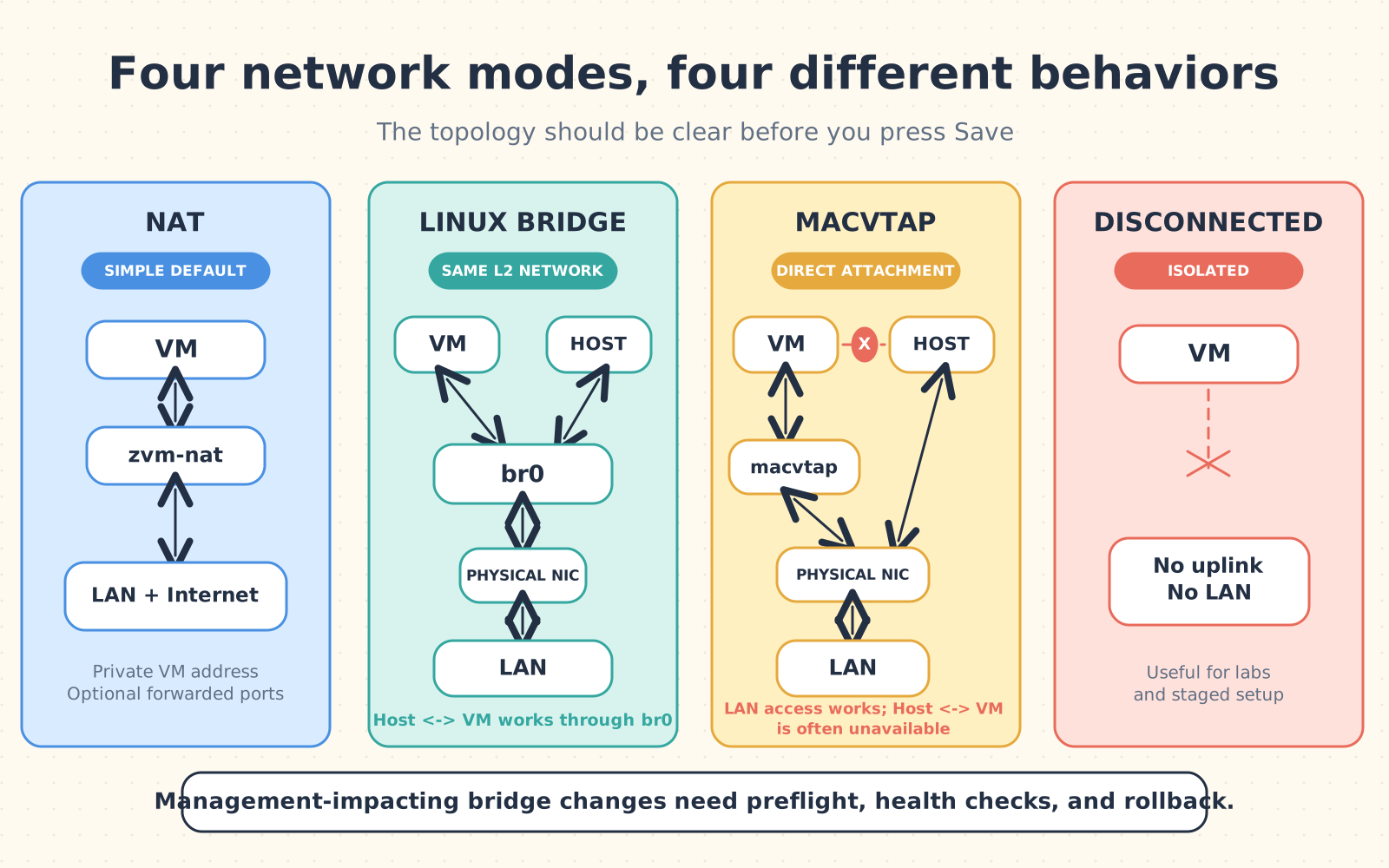
The labels may look similar in a settings form, but the host, VM, and LAN do not communicate in the same way.
The product target is 1-8 independently configured NICs per VM. NAT planning also includes DHCP reservations and TCP or UDP port forwarding. If a host port is duplicated or already occupied, ZVM should report a conflict instead of silently replacing another rule.
Bridge changes need special care on a headless home server. Moving the physical interface that carries the ZimaOS management connection can disconnect the same browser being used to make the change. The prototype treats that operation as a transaction: check the proposed setup, apply it, watch connectivity, and roll it back if the new path does not become healthy.
The same honesty should apply to changes that need a shutdown. If the host or guest cannot safely hot-plug a NIC, ZVM should save the requested configuration, mark it as pending restart, and avoid pretending the live VM already matches it.
Status: Prototype. Explicit interface modes, interface APIs, persistent NAT policies, forwarding rules, static network seeding, and guarded Linux bridge changes have working branch implementations. The hardware and upgrade matrices are not complete.
A Snapshot Is Not a Backup
A snapshot is a nearby rollback point. A backup is a separate copy meant to survive a problem with the original VM or storage. Putting both behind one vague button would make recovery harder, not easier.
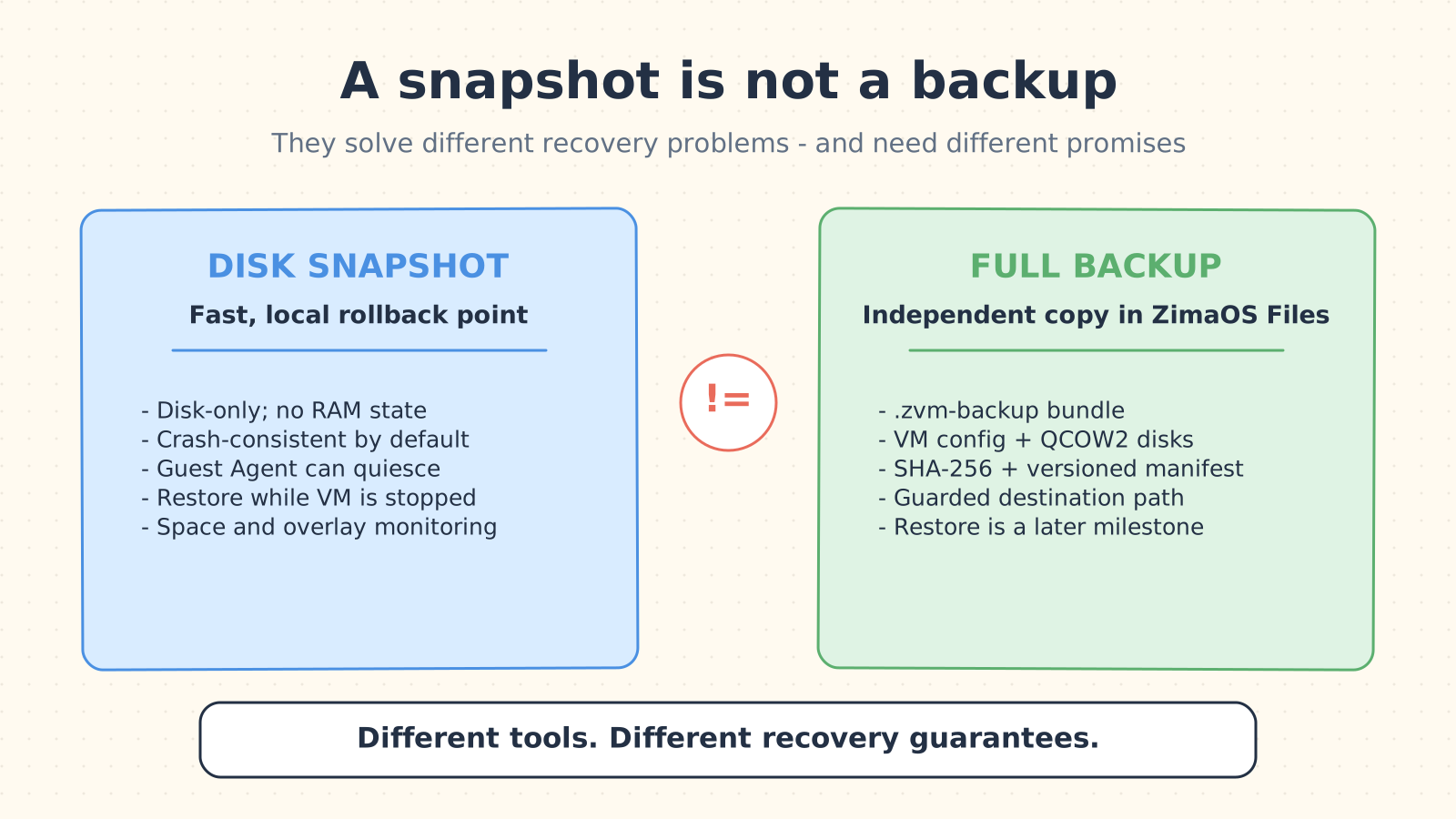
Snapshots and backups solve different problems. Backup restore remains a later milestone.
Disk snapshots for local rollback
The first snapshot design is disk-only. It does not capture RAM or resume an application at the exact instruction where it stopped.
For a powered-off QCOW2 VM, ZVM can copy a stable disk directly. For a running VM, the prototype creates a temporary external overlay to establish a point-in-time disk view, copies the stable base, and then commits and pivots the active disk back to its original path. The VM is not left depending on a growing chain of ZVM-managed overlays.
The default is crash-consistent, similar to the disk state after an unexpected loss of power. If the guest has a responsive QEMU Guest Agent, ZVM can offer a quiesced capture so the filesystem can flush and freeze around the snapshot. ZVM checks that capability at runtime instead of presenting a switch that may not work.
Restoring a disk snapshot requires the VM to be shut down. Before replacing disks, the prototype writes a recovery journal and temporarily manages autostart. If a multi-disk restore is interrupted, it can roll back instead of leaving the VM with disks from different points in time. Live captures also check available space and monitor the temporary overlay while the copy is running.
Full backups for an independent copy
The backup prototype creates a .zvm-backup bundle in an existing directory selected through ZimaOS Files. It records the inactive VM configuration, independent QCOW2 disk copies, SHA-256 checksums, file sizes, original disk mappings, and a versioned manifest.
Destination safety is part of the feature. ZVM runs with elevated storage access, so the implementation rejects operating-system paths, ZVM metadata locations, and symlink-based escapes rather than relying on a simple text check.
Important limitation: creating and listing backup bundles is part of the current prototype. Restoring a VM from a backup bundle is a separate milestone and must not be assumed to be available. Disk snapshots also do not include memory state.
Status: Prototype. The API, service implementation, interruption journals, path checks, and focused tests exist in work-in-progress code. Real libvirt, power-loss, low-space, and multi-disk tests remain release gates.
Autostart Should Not Be a Mystery Switch
Autostart is useful for Home Assistant, a router VM, or any service that should return after the host reboots. It is also risky when a VM depends on storage or networking that is not ready yet.
The current work makes the existing autostart setting visible through the API and records success or failure events when it changes. The broader design adds startup priority and a configurable delay, then waits for required host resources before starting dependent VMs.
Status: Prototype. Basic autostart control and event reporting are being exercised now. Dependency-aware ordering and delay are design targets, not finished behavior.
The Small Fixes Matter Too
New features do not help if an upgrade, a console session, or a failed operation leaves a VM in an unclear state. Several less visible fixes are moving alongside the larger work:
- Console access security: the browser-based VNC proxy now follows the expected authentication path in the current alpha code line. Device availability still follows the ZimaOS package rollout.
- Safer identity handling: authentication no longer trusts a client-controlled forwarded address to decide whether a request is local.
- Dotted image names: filenames such as
appliance-1.2.3.qcow2keep their useful version instead of being shortened incorrectly. - Canceled uploads: an interrupted image upload removes its partial file instead of leaving it behind as if it were usable.
- Saved versus live settings: network work reads the persistent VM definition and can show a pending restart instead of confusing the running state with the saved state.
- Network reconciliation: duplicate DHCP reservations, forwarding conflicts, and partially applied host-network policies receive explicit validation and rollback-oriented handling.
Other reports - including browser-console binary frames, reconnect loops, keyboard behavior, Windows installation, GRUB display, and upgrade compatibility - remain in the regression plan. They are not all fixed simply because they are being investigated.
Your Existing VM Should Stay Yours
Community VMs often contain hand-edited XML, unusual devices, custom firmware, or settings created by an older ZimaOS release. Rewriting the entire definition to change one field could erase exactly the customization that makes the VM useful.
The ZVM Next design takes an additive approach:
- Discover existing VMs without changing them.
- Patch only the XML nodes owned by the requested operation.
- Preserve UUIDs, existing MAC addresses, disk paths, NVRAM, autostart, and untouched devices.
- Explain whether a feature can be applied live, requires shutdown, needs explicit conversion, or is unsupported.
- Keep a failed new operation from making the VM unbootable under its previous configuration.
Before a stable release, the planned regression matrix covers existing Windows, Linux, Home Assistant OS, and OpenWRT or pfSense VMs across feature use, restart, upgrade, and rollback scenarios.
Passthrough Is Not Just a Checkbox
Hardware passthrough is one of the community’s most requested features. It is also one of the easiest to make unsafe by hiding too much complexity.
USB assignment can be relatively contained. PCIe and GPU passthrough depend on IOMMU groups, firmware, driver binding, device reset behavior, and what else shares the same group. Physical-NIC passthrough can remove an interface that ZimaOS itself needs. A checkbox cannot make incompatible hardware safe.
That is why PCIe, GPU, and physical-NIC passthrough remain a Research/Preview direction. Any public preview needs a compatibility matrix, clear host-impact warnings, recovery instructions, and a way to disable the feature independently.
Incremental backups, online storage migration, cross-host migration, clustering, high availability, distributed storage, RAM snapshots, and backup deduplication are also outside the current core scope.
Help Us Test the Real Workloads
We are sharing the boundaries as well as the ideas because the most useful feedback starts with a real workload.
Tell us:
- Which image format and appliance do you want to import?
- Do you need NAT, a true Linux bridge, macvtap, or an isolated multi-NIC lab?
- Is a crash-consistent snapshot still useful when QEMU Guest Agent is not installed?
- Where should full backups live, and what free-space protection do you expect?
- Which USB, PCIe, GPU, or NIC device do you want to pass through?
- Which current VM bug blocks you today?
For a bug report, include your Zima hardware or x86 host model, ZimaOS and ZVM versions, guest OS, VM firmware type, disk format and storage location, network mode, the exact action that failed, and the complete error shown in the UI.
Join the discussion in the ZimaSpace Community. Those details help other community members and the Zima team compare your report with known cases.
Our goal is not to move every libvirt switch into a web form. It is to make the VM workflows that matter on a home server understandable, recoverable, and safe enough to trust with the next reboot.
FAQ
Are all of these features available now?
No. The status table separates alpha foundation work, active validation, prototypes, and research. This article is a direction update, not release notes.
Will snapshots include the VM’s memory state?
Not in the current core design. The first implementation captures disks only. Running-VM snapshots are crash-consistent by default and can be filesystem-quiesced when QEMU Guest Agent is available.
Can every OVA, VMDK, or VDI image be imported?
Those formats are in the compatibility target, but real-world images vary. Firmware, architecture, controllers, drivers, encryption, corruption, and vendor-specific OVF metadata can still make an image incompatible. ZVM should reject unsupported cases with an actionable explanation rather than create a VM that cannot boot.
Is backup restore already supported?
No. The current prototype creates and lists full backup bundles. Restore from those bundles is planned as a separate, explicitly tested workflow.
Will GPU passthrough work on every Zima device?
No. It depends on the CPU, firmware, IOMMU grouping, GPU, host driver, guest driver, and reset behavior. It remains a research and preview area until the supported matrix and recovery path are clear.