
In Photos, enter the name of an object in a photo or text that appears in an image to find related photos. You can use these searches even if your device has no GPU.
When you use Photos on ZimaOS, the system automatically downloads the models needed for object and text recognition in the background. Both types of recognition run locally on your device. Keep the device connected to the internet while the required models download.
After you add photos to the library, Photos automatically analyzes the objects and text in them and builds a search index. Once the relevant analysis is complete, you can search using the content described below without remembering filenames or dates.
Check the processing progress in Settings → Search → Search readiness. Content analysis may continue after photo importing has finished.
Analysis runs gradually in the background. Photos that have completed the relevant recognition and indexing can appear in search results before the entire library has been processed. The object and text searches described here do not require Deep visual understanding to be enabled, and you do not need to wait for its processing to finish.
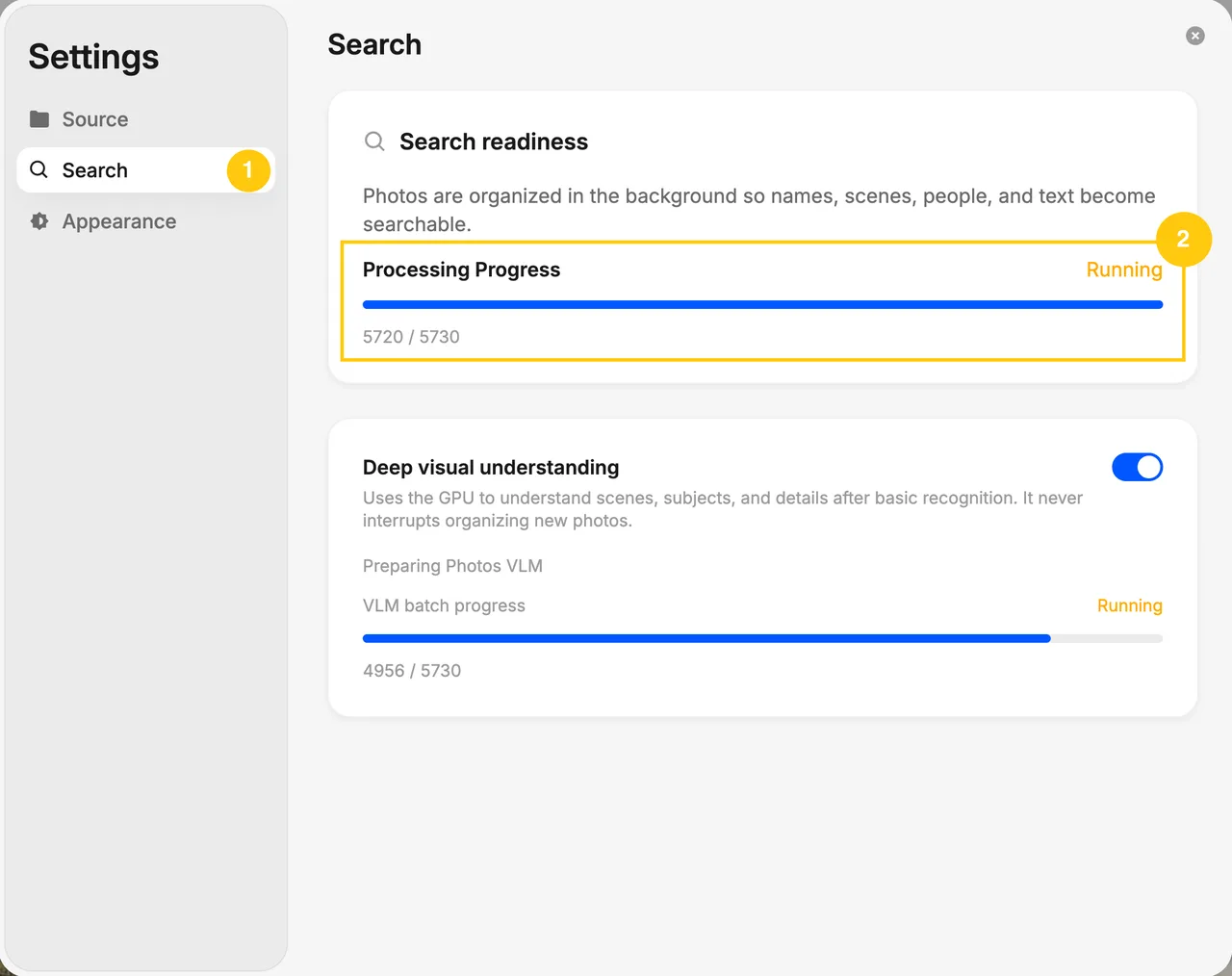
The search settings show processing progress and the Deep visual understanding option. Deep visual understanding uses a GPU; basic object and text searches work without enabling it.
Remember What Was in the Photo

Enter the object’s name in the search box. Photos finds images in which that type of object has been recognized.
- To find photos of cats, search for cat.
- To find a cake you photographed, search for cake.
- To find photos containing a suitcase, search for suitcase.
You can search for common animals, vehicles, food, furniture, and everyday items, such as dogs, bicycles, pizza, sofas, and phones.
Start with a specific object name. For example, to find a birthday cake photo, try cake first.

Remember What Was Written in the Image
You can find screenshots, receipts, menus, signs, and photographed documents using the text recognized in them.
- To find a receipt, search for the store name printed on it.
- To find a screenshot of an event announcement, search for the event name.
- To find a menu you photographed, search for 桂花拿铁 (osmanthus latte) if those words appear on it.
Enter a few characters that actually appear in the image. Recognition supports common Chinese characters, English, and numbers. Choosing distinctive text helps narrow the results.
Before You Search
After photos are added to the library, Photos analyzes their visual content and text in the background. New photos need to finish the relevant analysis before you can find them by that content.
Objects that are too small or obscured, and text that is blurry or affected by glare, can be harder to recognize. If no results appear, try another object name or a different piece of text from the image.
This article covers common object recognition and image text recognition. These features do not identify people or pets by name from their appearance, or interpret complex descriptions of actions or emotions. If a name appears as text in the image, you can still try searching for that text.
Full Recognition Coverage
Photos basic object recognition covers the following 80 categories. Use them as clues when looking for photos.
| Group | Recognized objects |
|---|---|
| People | Person |
| Animals | Bird, cat, dog, horse, sheep, cow, elephant, bear, zebra, giraffe |
| Vehicles | Bicycle, car, motorcycle, airplane, bus, train, truck, boat |
| Street objects | Traffic light, fire hydrant, stop sign, parking meter, bench |
| Personal items | Backpack, umbrella, handbag, tie, suitcase |
| Sports equipment | Frisbee, skis, snowboard, sports ball, kite, baseball bat, baseball glove, skateboard, surfboard, tennis racket |
| Tableware and containers | Bottle, wine glass, cup, fork, knife, spoon, bowl |
| Food | Banana, apple, sandwich, orange, broccoli, carrot, hot dog, pizza, doughnut, cake |
| Furniture and home | Chair, sofa, potted plant, bed, dining table, toilet |
| Electronics | TV, laptop, mouse, remote control, keyboard, phone |
| Kitchen equipment | Microwave, oven, toaster, sink, refrigerator |
| Other everyday items | Book, clock, vase, scissors, teddy bear, hair dryer, toothbrush |
These are object categories. For example, sports ball does not mean Photos distinguishes every type of ball, and potted plant does not mean it identifies plant species.
What else can you search for on devices that meet the hardware requirements for Deep visual understanding? We will cover that in a separate article.